
Structure of Computer
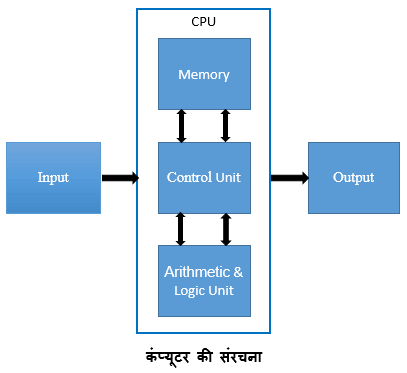
एक पर्सनल कंप्यूटर सिस्टम का निर्माण अनेक प्रकार की छोटी-छोटी Devices को जोड़ कर किया जाता है । इन Devices को उनके कार्य के आधार पर तीन पार्ट में बाटा गया है । Input Devices, Output Devices तथा Processing Devices । इन तीनो Devices के पारस्परिक सम्बन्ध को चित्र में स्पस्ट किया गया है ।
New Syllabus CCC Online Mock Test Hindi
Quiz-summary
0 of 30 questions completed
Questions:
- 1
- 2
- 3
- 4
- 5
- 6
- 7
- 8
- 9
- 10
- 11
- 12
- 13
- 14
- 15
- 16
- 17
- 18
- 19
- 20
- 21
- 22
- 23
- 24
- 25
- 26
- 27
- 28
- 29
- 30
Information
.
You have already completed the quiz before. Hence you can not start it again.
Quiz is loading...
You must sign in or sign up to start the quiz.
You have to finish following quiz, to start this quiz:
Results
0 of 30 questions answered correctly
Your time:
Time has elapsed
You have reached 0 of 0 points, (0)
| Average score |
|
| Your score |
|
Categories
- Word 0%
| Pos. | Name | Entered on | Points | Result |
|---|---|---|---|---|
| Table is loading | ||||
| No data available | ||||
- 1
- 2
- 3
- 4
- 5
- 6
- 7
- 8
- 9
- 10
- 11
- 12
- 13
- 14
- 15
- 16
- 17
- 18
- 19
- 20
- 21
- 22
- 23
- 24
- 25
- 26
- 27
- 28
- 29
- 30
- Answered
- Review
-
Question 1 of 30
1. Question
1 pointsएम एस वर्ड 2007 मे टेक्ट् सलेक्ट करने पर ……………… स्वंत: प्रदर्शित होता है।
Correct
Incorrect
-
Question 2 of 30
2. Question
1 pointsएम एस वर्ड मे बनी हुई फाइल का एक्सटेंशन होता है।
Correct
Incorrect
-
Question 3 of 30
3. Question
1 pointsलाईन के आरम्भ मे जाने के लिए किस कुंजी का उपयोग किया जाता है।
Correct
Incorrect
-
Question 4 of 30
4. Question
1 pointsटी ओ सी का उपयोग करके आप क्या बना सकते है।
Correct
Incorrect
-
Question 5 of 30
5. Question
1 pointsवर्ड 2010 के फाइल मेन्यू के क्या कार्य कर सकते हैं।
Correct
Incorrect
-
Question 6 of 30
6. Question
1 points———————– के जरिए आप वर्तमान डॉक्यूमेंन्ट की किसी लोकेशन को दूसरे डॉक्यूमेंन्ट या वेबसाइट से जोड़ते हैं।
Correct
Incorrect
-
Question 7 of 30
7. Question
1 pointsसबस्क्रिप्ट करने की शॉर्टकट कुंजी ——————— होती हैं।
Correct
Incorrect
-
Question 8 of 30
8. Question
1 pointsसुपरस्क्रिप्ट करने की शॉर्टकट कुंजी —————— होती हैं।
Correct
Incorrect
-
Question 9 of 30
9. Question
1 pointsडबल लाइन स्पेसिंग की शॉर्टकट कुंजी ——————— होती हैं।
Correct
Incorrect
-
Question 10 of 30
10. Question
1 pointsकिस कमाण्ड द्वारा अन्य सॉफ्टवेयर से लाए गए ऑब्जेक्ट में परिवर्तन कर सकते हैं
Correct
Incorrect
-
Question 11 of 30
11. Question
1 pointsकिसी भी टेक्सट व ग्राफिक्स को कट और कॉपी करने से पहले वह किस स्थिति में होना चाहिए।
Correct
Incorrect
-
Question 12 of 30
12. Question
1 points———————— समानार्थक शाब्दों की शब्दकोष है जिसका उपयोग समानार्थक शब्दों को खोजने के लिए कर सकते हैं।
Correct
Incorrect
-
Question 13 of 30
13. Question
1 pointsकिस कमाण्ड की सहायता से किसी भी टैक्स्ट, फुटनोट, एंडनोट या मार्क को सर्च किया जा सकता हैं।
Correct
Incorrect
-
Question 14 of 30
14. Question
1 pointsवेब पेज डिजाइन करते समय ——————- स्क्रिप्ट भाषा का प्रयोग किया जाता हैं।
Correct
Incorrect
-
Question 15 of 30
15. Question
1 points———————— एक विषय सूची हैं जो डॉक्यूमेंन्ट में अपने संबंधित रेफ्रेन्स पेज के साथ उपस्थित होता हैं।
Correct
Incorrect
-
Question 16 of 30
16. Question
1 pointsरिप्लेस कमाण्ड की सहायता से डॉक्यूमेंन्ट में दी गई कौन-कौन सी चीजों को बदला जा सकता हैं।
Correct
Incorrect
-
Question 17 of 30
17. Question
1 pointsकट व कॉपी करने पर सिलेक्टेड टेक्स्ट कहाँ चला जाता हैं।
Correct
Incorrect
-
Question 18 of 30
18. Question
1 pointsकिस व्यू में हैडर, फुटर, बैकग्राउंड आदि स्क्रीन पर प्रदर्शित होती हैं।
Correct
Incorrect
-
Question 19 of 30
19. Question
1 pointsकिस व्यू में डॉक्यूमेंन्ट साधारण रूप में फॉरमेटिंग के बिना नजर आता हैं।
Correct
Incorrect
-
Question 20 of 30
20. Question
1 pointsडॉक्यूमेंन्ट को स्वत: ही सही करने के लिए हम ——————- का उपयोग करते हैं।
Correct
Incorrect
-
Question 21 of 30
21. Question
1 pointsकौन-कौन सी कमाण्ड्स के लिए एक ही डायलॉग बॉक्स होता हैं।
Correct
Incorrect
-
Question 22 of 30
22. Question
1 pointsनिम्न में से कौन सा रिबन टैब, वर्ड 2007 में नहीं होता हैं।
Correct
Incorrect
-
Question 23 of 30
23. Question
1 pointsसेव एज कमाण्ड द्वारा हम अपने डॉक्यूमेंन्ट फाइल को किस फॉरमेट में सेव कर सकते हैं।
Correct
Incorrect
-
Question 24 of 30
24. Question
1 pointsप्रिंट कमाण्ड के पेज रेंज में कौन सा ऑप्शन होता हैं।
Correct
Incorrect
-
Question 25 of 30
25. Question
1 pointsकिस कमाण्ड से डॉक्यूमेंन्ट को ई-मेल द्वारा किसी को भी भेज सकते हैं।
Correct
Incorrect
-
Question 26 of 30
26. Question
1 pointsपहले से सेव किए गए डॉक्यूमेंन्ट को किसी अन्य नाम से सेव करने के लिए ———————- कमाण्ड का उपयोग किया जाता हैं।
Correct
Incorrect
-
Question 27 of 30
27. Question
1 pointsहैडर व फुटर ऑप्शन किस कमाण्ड की सहायता से बदले जा सकते हैं।
Correct
Incorrect
-
Question 28 of 30
28. Question
1 pointsवर्ड में नया डॉक्युमेंट किस टेम्पलेट पर आधारित होता हैं।
Correct
Incorrect
-
Question 29 of 30
29. Question
1 pointsवर्ड की फाइल में क्या-क्या हो सकता हैं।
Correct
Incorrect
-
Question 30 of 30
30. Question
1 pointsसिलेक्टेड लाइन को इटैलिक करने की शॉर्टकट कुंजी हैं।
Correct
Incorrect
कंप्यूटर किसी भी कार्य को करने के लिए Input Device से निर्देश प्राप्त करता है । इसकी संसाधक devices, input devices, से प्राप्त निर्देशों के अनुसार कार्यान्वित हो कर परीणामो की गड़ना करता है । इसमें सभी प्रकार की गणितीय (Arithmetical) एव logical समस्याओं का समाधान किया जाता है । Processing के पश्चात प्राप्त परीणामो को Output Devices की सहायता से कंप्यूटर हमारे समक्ष प्रस्तुत कर देता है ।
Part of Computer
कंप्यूटर को संरचनात्मक रूप से निम्न चार भागों में बाटा गया है —
(1) Central Processing Unit
(2) Memory
(3) Input Devices
(4) Output Devices
Central Processing Unit
कंप्यूटर का वह भाग जहाँ पर प्राप्त सूचनाओ की गड़ना एवं उनका संसाधन होता है, Central Processing Unit कहलाता है । इसको दो भागों में बाटा जा सकता है –
(a) Control Unit
(b) Arithmetic & Logical Unit-ALU
Control Unit
Control Unit का कार्य कंप्यूटर के इनपुट एवं आउटपुट Devices तथा Standard Devices को control में रखना है । Input devices से सूचनाओ को प्राप्त करना इन्हें कंप्यूटर के समझने योग्य संकेतो में बदल कर Arithmetic & Logical Unit-ALU को भेजना ALU से संसाधन के उपरांत प्राप्त परीणामो Output device तक भेजना, memory का उचित प्रयोग करना एवं output devices को संसाधन के उपरांत प्राप्त परीणाम को प्रस्तुत करने के लिए भेजना इसका मुख्य कार्य है ।
(1) सर्वप्रथम Input devises के सहायता से सुचना/आंकड़े/डेटा को कंट्रोलर तक लाना ।
(2) Controller द्वारा सुचना/आंकड़े/डेटा को मेमोरी में उचित स्थान प्रदान करना ।
(3) Memory से आंकड़े पुनः Control में लाना एवं इन्हें ALU को भेजना ।
(4) ALU से प्राप्त परीणामो को Output devices पर भेजना ।
Arithmetic & Logical Unit-ALU
कंप्यूटर अंकगणितीय गड़नाओ के दो प्रमुख सिद्धांत हैं — पहला सभी तरह का अंकगणितीय (जोड़, घटना, गुणा, भाग) एक तरह के जोड़ द्वारा कर लिया जाता है एवं दूसरा ऐसा करने के लिए हमें 1 व 0 के अंकों के जोड़ना होता है जिससे 1 एवं 0 अंक प्राप्त होते हैं । कंप्यूटर में सभी कार्य (Logic Gate) द्वारा किया जाता है गेट कई प्रकार के होते हैं जैसे AND Gate, OR Gate, NOT Gate इत्यादि ।
(1) AND Gate के आउटपुट सिग्नल ‘1’ तब होते हैं जब इसका कोई भी इनपुट सिग्नल ‘1’ हो ।
(2) OR Gate आउटपुट सिग्नल ‘1’ तब होता है जब इसका इनपुट सिग्नल ‘1’ अथवा ‘0’ में से कोई भी हो ।
(3) NOT Gate आउटपुट उसके इनपुट का उल्टा होता है ।
एक गेट का आउटपुट दुसरे इनपुट के रूप में प्रयोग किया जाता है जिससे एक (Circuit) बनता है । जिसके लिए हमें चार कार्य करने होते हैं ।
(i) 0+0=0 Carry 0
(ii) 0+1=1 Carry 0
(iii) 1+0=1 Carry 0
(iv) 1+1=0 Carry 0
New Syllabus CCC Online Mock Test English
Quiz-summary
0 of 30 questions completed
Questions:
- 1
- 2
- 3
- 4
- 5
- 6
- 7
- 8
- 9
- 10
- 11
- 12
- 13
- 14
- 15
- 16
- 17
- 18
- 19
- 20
- 21
- 22
- 23
- 24
- 25
- 26
- 27
- 28
- 29
- 30
Information
Dear Students, CCC Online Test के Preparation के Purpose से यह 30 Question English में है । इसमें CCC Exam में पूछे जाने वाले Question का Collection है । प्रत्येक Question का Answer देने पर एक Point मिलेगा । एवं पास होने के लिए 50% Marks लाना अनिवार्य है । Test को शुरू करने के लिए Start Button पर Click करना होगा । इसके सभी Question के Answer देने होंगे । Last में जाकर Finish Button पर Click करना होगा उसके बाद आपका Result Screen पर दिखाई देगा ।
You have already completed the quiz before. Hence you can not start it again.
Quiz is loading...
You must sign in or sign up to start the quiz.
You have to finish following quiz, to start this quiz:
Results
0 of 30 questions answered correctly
Your time:
Time has elapsed
You have reached 0 of 0 points, (0)
| Average score |
|
| Your score |
|
Categories
- Not categorized 0%
-
End of Quiz
| Pos. | Name | Entered on | Points | Result |
|---|---|---|---|---|
| Table is loading | ||||
| No data available | ||||
- 1
- 2
- 3
- 4
- 5
- 6
- 7
- 8
- 9
- 10
- 11
- 12
- 13
- 14
- 15
- 16
- 17
- 18
- 19
- 20
- 21
- 22
- 23
- 24
- 25
- 26
- 27
- 28
- 29
- 30
- Answered
- Review
-
Question 1 of 30
1. Question
1 pointsThe following is not a computer type.
Correct
Incorrect
-
Question 2 of 30
2. Question
1 pointsWhat is the shortcut key to edit cells in LibreOffice?
Correct
Incorrect
-
Question 3 of 30
3. Question
1 pointsWhat is the shortcut for inserting a date in Calc?
Correct
Incorrect
-
Question 4 of 30
4. Question
1 pointsCan I say prepaid card?
Correct
Incorrect
-
Question 5 of 30
5. Question
1 pointsWhat is the full form of DVD?
Correct
Incorrect
-
Question 6 of 30
6. Question
1 pointsWhat is called @ in the mail
Correct
Incorrect
-
Question 7 of 30
7. Question
1 pointsWhat is the default cell width in LibreOffice calc?
Correct
Incorrect
-
Question 8 of 30
8. Question
1 pointsWhen did NEFT start?
Correct
Incorrect
-
Question 9 of 30
9. Question
1 pointsNot an example of IM?
Correct
Incorrect
-
Question 10 of 30
10. Question
1 pointsWhat is the shortcut for inserting a time in Calc?
Correct
Incorrect
-
Question 11 of 30
11. Question
1 points. What type of computer is a personal computer?
Correct
Incorrect
-
Question 12 of 30
12. Question
1 pointsWhat is the full form of IOT?
Correct
Incorrect
-
Question 13 of 30
13. Question
1 pointsDoes Calc have a freeze cell?
Correct
Incorrect
-
Question 14 of 30
14. Question
1 pointsWhat coordinates between the user and the software?
Correct
Incorrect
-
Question 15 of 30
15. Question
1 pointsWhat is the maximum limit for sending attachments by email?
Correct
Incorrect
-
Question 16 of 30
16. Question
1 pointsWhat is the full form of ECS?
Correct
Incorrect
-
Question 17 of 30
17. Question
1 pointsWhich menu has the option to cut, copy and paste?
Correct
Incorrect
-
Question 18 of 30
18. Question
1 pointsIn LibreOffice?
Correct
Incorrect
-
Question 19 of 30
19. Question
1 pointsImage direction can be changed.
Correct
Incorrect
-
Question 20 of 30
20. Question
1 pointsWhat is the full form of EEPROM?
Correct
Incorrect
-
Question 21 of 30
21. Question
1 pointsWhich of the following social media is most popular?
Correct
Incorrect
-
Question 22 of 30
22. Question
1 pointsWhere is the sent mail stored?
Correct
Incorrect
-
Question 23 of 30
23. Question
1 pointsIBM 1401 is related to?
Correct
Incorrect
-
Question 24 of 30
24. Question
1 pointsWhat is the shortcut to open a new le in LibreOffice Writer?
Correct
Incorrect
-
Question 25 of 30
25. Question
1 pointsWhat is the default cell height in LibreOffice calc?
Correct
Incorrect
-
Question 26 of 30
26. Question
1 pointsWhat is the shortcut key to save as in Writer?
Correct
Incorrect
-
Question 27 of 30
27. Question
1 pointsWhat generation computer is IBM 1401?
Correct
Incorrect
-
Question 28 of 30
28. Question
1 pointsWhen did twitter start?
Correct
Incorrect
-
Question 29 of 30
29. Question
1 pointsWhat is the full form of AEPS?
Correct
Incorrect
-
Question 30 of 30
30. Question
1 pointsWhat is 3D printing used for?
Correct
Incorrect
Memory of Computer
हमारे मस्तिष्क का भी एक भाग मेमोरी के लिए प्रयोग किया जाता है । यदि हमें कोई कोई गड़ना करनी है तो जिन संख्याओ की गड़ना की जानी है उसको पहले मेमोरी में रखते हैं । फिर गड़ना के उपरांत परिणामो को मेमोरी में रखने के बाद ही उत्तर देते हैं । अतः स्पस्ट है की मेमोरी हमारे मस्तिष्क में दिए जाने वाले संदेशो,सूचनाओ निर्देशों आदि को संचित कर रखने वाला एक भाग है । इसी प्रकार कंप्यूटर में किसी भी निर्देश, सुचना अथवा परिणाम को स्टोर करके रखने के लिए इसकी मेमोरी का प्रयोग किया जाता है ।
स्मृति में संचय की विधियाँ
कंप्यूटर की मेमोरी में प्रोग्राम को स्टोर करेने के लिए निम्लिखित दो मेथड हैं –
(1) SAM (Sequential Access Memory)—SAM का तात्पर्य क्रमिक अर्थात क्रमवार लिखना या पढना ।
(2) RAM (Random Access Memory) RAM का अर्थ है आकस्मिक मेमोरी अर्थात किसी भी क्रम में लिखना पढना ।
Type of Memory
Compute की मेमोरी दो प्रकार की होती है – Primary Memory एव Secondary Memory ।
Primary Memory
Computer की Primary memory I.C. के रूप में होती है । internal memory को internal memory कहा जाता है । कंप्यूटर की इंटरनल मेमोरी को दो भागों में बाटा गया है । Read Only Memory एवं Read/Write Memory ।
(1) Read Only Memory
Read only memory एक I.C. (Integrate Circuit) केव रूप में होती है । इसमें लिखे गए प्रोग्रोम के आउटपुट को पढ़ा जा सकता है इसमें कोई प्रोग्राम या सुचना स्टोर नहीं किया जा सकता । जयादा तर ROM में Manufacturer द्वारा प्रोग्राम परमानेंट स्टोर कर दिए जाते हैं जो समयानुसार कार्य करते रहते हैं । (Basic Input Output System: BIOS) ROM का उदाहरण है । Read only memory कुछ जिनकी I.C का नाम PROM, EPROM, EEPROM.
(i) PROM
इस प्रकार की ROM I.C. किसी प्रोग्राम को केवल एक बार ही स्टोर किया जा सकता है । प्रोग्राम स्टोर करने के बाद न तो उसे मिटाया जा सकता है और न ही उसे संसोधित किया जा सकता है ।
(ii) EPROM
इस प्रकार की ROM I.C. में स्टोर किये गए प्रोग्राम को पैराबैगनी किरणों के माध्यम से मिटा कर दोबारा भी प्रयोग में लाया जा सकता है ।
(iii) EEPROM
एलेक्ट्रिकली ईरेजबल प्रोग्राम पर स्टोर किये गए प्रोग्राम को मिटाने अथवा संसोधित करने के लिए किसी विशेष उपकरण की आवश्यकता नहीं होती ।
(2) Read/Write Memory
इस प्रकार की मेमोरी में हम अपने प्रोग्राम एवं इसमें किये गए कार्य को कुछ समय के लिए स्टोर कर सकते है । आम बोलचाल में इस RAM को Random access memory कहते हैं यह दो प्रकार की होती हैं ।
(i) DRAM
Dynamic का अर्थ है गतिशील इस RAM पर यदि 10 आंकड़े संचित कर दिए जाये और फिर उनमे से बीच के दो आंकड़े मिटा दिए जाए तो उसके बाद वाले बचे सभी आंकड़े बीच के रिक्त स्थान में स्वत: चले जाते हैं और बीच के रिक्त स्थान का उपयोग हो जाता है ।
(ii)SRAM
Static RAM में संचित किये गए आंकड़े रहते हैं । इस RAM में बीच के दो आंकड़े मिटा दिए जाए तो उसके बाद वाले खिसक कर नहीं आयेंगे । फलस्वरूप यह स्थान तब तक प्रयोग नहीं किया जा सकता जब तक की पूरी मेमोरी को ‘वाश’ करके नए सिरे से काम शुरू न किया जाए ।
Secondary Memory
Secondary memory को External Memory या Auxiliary Memory भी कहते हैं । कंप्यूटर पर किये गए अपने कार्य को स्टोर करने के लिए किया जाता है ।
Input Devices
वे devices जिनका प्रयोग कंप्यूट में आकडे प्रविष्ट करने एवं निर्देश देना के लिए किया जाता है उन्हें Input Devices कहा जाता है । जैसे Keyboard, Mouse , Joystick, Light Pen ।
Output Devices
वे Devices जिनका उपयोग कंप्यूट से प्राप्त परिणामो को प्राप्त करने के लिए किया जाता है, निर्गम अथवा आउटपुट devices कहलाती है । जैसे Printer, Plotter, और Visual Display Unit हैं ।
Classification of Computer
About me
