
EXPERIMENT No-6
OBJECT: Simulation of Switch Configuration VLAN.
REQUIRED SOFTWARE: Cisco Packet Tracer 8.1.1
Network Diagram
Setup this network:
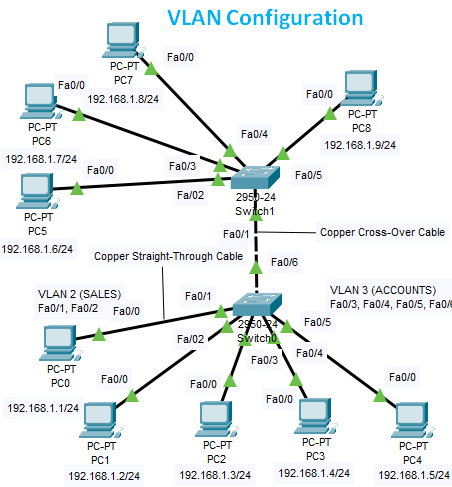
Switch>enable
Switch#config t
Switch(config)#hostname SW1
SW1(config)#do show vlan
SW1(config)#exit
SW1#vlan database
% Warning: It is recommended to configure VLAN from config mode,
  as VLAN database mode is being deprecated. Please consult user
  documentation for configuring VTP/VLAN in config mode.
SW1(vlan)#vlan 2 name Sales
VLAN 2 added:
    Name: Sales
SW1(vlan)#exit
SW1#show vlan
SW1#config t
SW1(config)#vlan 3
SW1(config-vlan)#name Accounts
SW1(config-vlan)#exit
SW1(config)#int fa 0/1
SW1(config-if)#switchport mode access
SW1(config-if)#switchport  access vlan 2
SW1(config-if)#exit
SW1(config)#int fa 0/2
SW1(config-if)#switchport mode access
SW1(config-if)#switchport  access vlan 2
SW1(config-if)#int range fa 0/3- 6
SW1(config-if-range)#switchport mode access
SW1(config-if-range)#switchport  access vlan 3
SW1(config-if-range)#exit
SW1(config)#exit
SW1#show vlan
What is VLAN
A virtual LAN or VLAN is a concept by which we can split the device on layer two ie data link layer.
Normally the broadcast domain is divided into level 3 layers but here also we can do this by using switches from the concept of VLANs.
A broadcast domain is a network segment in which all devices in the same broadcast domain will receive it if the device broadcasts a packet.
All devices in the same broadcast domain will receive all broadcast packets but are limited to switches because routers do not forward out broadcast packets.
That’s why inter-VLAN routing is needed to forward packets to a different VLAN (from one VLAN to another VLAN) or to broadcast the domain.
VLANs create various small-sized sub-networks that are relatively easy to handle.
VLAN Ranges
To understand VLANs and their range, consider this table carefully:
| VLANs | Range | Usage | Propagated by VTP |
| 0, 4095 | Reserved | For system use only. You cannot see and use these VLANs. | No |
| 1 | Normal | Default VLAN 1 can use it but cannot delete it. | Yes |
| 2-1001 | Normal | Ethernet is used for VLANs. You can create, use and delete them. | Yes |
| 1002-1005 | Normal | Cisco Default and Token Ring for FDDI. You cannot delete these VLANs. | Yes |
| 1006-4094 | Extended | For Ethernet VLANs only. Keep these things in mind when configuring extended VLANs: • Layer 3 ports and some software features require internal VLANs. Internal VLANs are allowed at 1006 and above. You cannot use a VLAN allocated for such use. Internal users To display VLANs, enter the show VLAN brief command. • The configuration of VLANs 1006-1024 does not support the witch running on the catalyst product family. If you configure VLANs 1006-1024, make sure that VLANs are not extended to any switch that runs on the catalyst product family. Huh. • You must enable the Extended System ID so that you can use Extended Range VLANs. |
VLAN Configuration
If you want to create a VLAN, you can do this by giving the name and id directly:
Switch(config)#int fa0/0
Switch(config-if)#switchport mode access
Switch(config-if)#switchport access Vlan 2
Now you can also assign the range of switch ports to whatever VLAN you want:
Switch(config)#int range fa0/0-2
Switch(config-if)#switchport mode access
Switch(config-if) #switchport access Vlan 2
Now switchport fa0 / 0, fa0 / 1, fa0-2 will be assigned to vlan2.
Advantages of VLAN
Now we are telling you some benefits of VLAN which are as follows:
- Performance–
Network traffic is filled with broadcast and multicast. VLAN eliminates the need to send such traffic to the location where we are not required. As an example, suppose traffic is designed for two devices but if there are ten devices in the same broadcast domain, then traffic will reach everywhere and this will lead to waste of bandwidth. But if we create a VLAN then the multicast and broadcast packet will go to the device where we want to send it. - Making of Virtual Group– Just as all organizations or companies have many departments like sales, management etc.
- VLAN devices can be grouped into different logically created groups according to their need and department.
- Security– In the same network, if the sensitive data is broadcast, then any external can access it, but after creating a VLAN we can control the broadcast domain and also Restricted Access by creating a firewall. Not only this, it is also capable of giving any kind of external access information to the network manager. That’s why VLAN also increases network security
- Flexibility– It also allows us to increase or decrease the number of hosts
- Cost-Deduction– Broadcast domains can also be created using VLANs that do not require expensive routers.
· In addition, using VLANs, the number of smaller broadcast domains can also be increased, which is easier to handle than larger broadcast domains.
Download Cisco Packet Tracer 6.22
Download Cisco Packet Tracer 8.1.1
Half Duplex
Cyclic Redundancy Code
Agreements on how communication components and DTE
X.25 level 2-ISO
Mesh topology
The number of bytes transmitted per unit time.
Synchronization
Baseband signal
300
ARPANET
45
8
Star topology
6000 bps
Residual Error Rate.
Capability Data
Data Link
Pin-code
Mesh
Half Duplex
PAN
Represents symbol or characters used in any langua
Hardware and software
Both stations can transmit and receive data at the
Timeliness
5 Components
Multi-point
Transits
Transit time
